An agent is an LLM running in a loop that can call tools. Instead of answering in one shot, it decides on an action, sees the result, and decides again until the task is done or it gives up.
That's all it is. The engineering is in the tools, the loop's limits and what happens when it goes wrong.
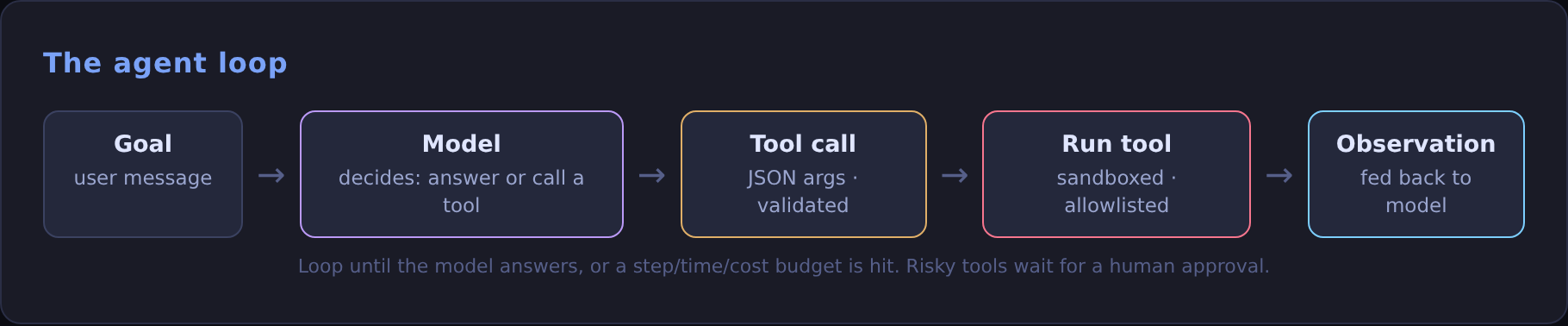
The loop
Model providers support tool calling (also called function calling): you describe each tool with a name, a description and a JSON schema, and the model returns a structured call instead of prose.
Design tools like an API for a junior engineer
- Few, clear tools beat many vague ones.
get_policy(policy_id)is better thanrun_sql(query). - Write the description for the model. Say when to use the tool, what it returns and what it can't do.
- Return compact, useful results. Twenty relevant rows, not a 10,000-row dump that fills the context window.
- Return errors as text the model can act on: "policy_id must look like POL-123456", not a stack trace.
Start with a workflow, not an agent
If the steps are known in advance (extract, then validate, then load), write them as a fixed pipeline with an LLM call in one or two steps. It's cheaper, faster and easier to test. Reach for a free-running agent only when the path genuinely depends on what it finds along the way.
Guardrails that matter
- Step and cost limits on every run.
- Least privilege. Read-only tools by default; separate, narrow tools for writes.
- A human approves anything irreversible: sending an email, paying, deleting, deploying.
- Treat tool output as untrusted data. A web page or document can contain text that tries to give the agent instructions (prompt injection). Never let retrieved content grant new permissions.
- Validate tool arguments against the schema before running anything.
Make it observable
Log every step: the prompt, the tool call, its arguments, the result, tokens used and time taken. When an agent fails, the trace is the only way to tell whether the model chose the wrong tool, the tool returned something confusing or the task was underspecified.
Evaluate on tasks, not vibes
Keep a set of realistic tasks with a known correct outcome and run the agent against them after every change to the prompt, tools or model. Track success rate, steps and cost per task. An agent that's 5% more accurate but three times as expensive may not be an improvement.
Try it: a tool-calling agent in 25 lines
This runs the loop above against a local model through Ollama's tool calling. One tool, an allowlist of paths, and a four-step budget:

Try asking it about /etc and watch the allowlist return an error the model has to deal with. That's the guardrail doing its job. For a full agent with memory, skills and a chat front end, see how I run OpenClaw over Telegram.