A table model rebuilds everything on every run. That's simple and correct, and it's the right default until the table gets big. An incremental model processes only new or changed rows and merges them into what's already there. It's faster and cheaper, and it's also where most dbt bugs live.
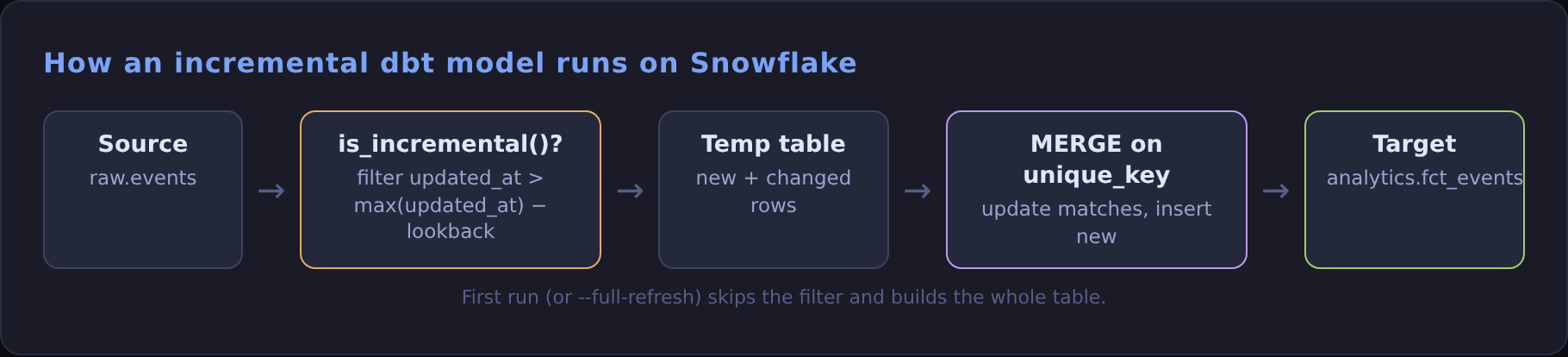
dbt run does on every run after the first.The minimal correct version
{% raw %}
{% endraw %}
What each piece does:
unique_keytells dbt how to match incoming rows to existing ones. Without it, the merge becomes a plain append and reruns create duplicates.incremental_strategy = 'merge'is the default on Snowflake. It's written out here so nobody has to wonder.is_incremental()is false on the first run and on--full-refresh, so the filter only applies once the table exists.- The 3-day lookback catches late-arriving rows. Filtering on exactly
> max(updated_at)silently drops any record that lands after a later one has already been loaded.
Things that bite
- Duplicate keys in the source. If
stg_claimshas two rows for oneclaim_id, the merge errors out. Deduplicate in staging withqualify row_number() over (partition by claim_id order by updated_at desc) = 1. - Logic changes don't backfill themselves. Change a calculation and only new rows get it. Run
dbt run --select my_model --full-refreshafter changing business logic. - Schema changes. The default
on_schema_changeisignore, so new columns just don't appear.append_new_columnsorsync_all_columnsis usually what you want. - Hard deletes are invisible. Rows deleted upstream stay in your table forever. Use a soft-delete flag from the source, or a snapshot.
Test it like you mean it
A unique test on the unique_key is the cheapest insurance you can buy for an incremental model. It fails the build the first time a duplicate slips through.
When to go incremental
Stay on table until a full rebuild is noticeably slow or expensive. Incremental models trade simplicity for speed, so make the trade only when you need to.
Try it locally with DuckDB
You don't need a Snowflake account to see the behaviour. dbt-duckdb runs the same Jinja and the same merge strategy on your laptop.
Add a two-line dbt_project.yml (name and profile) and a profiles.yml with type: duckdb and path: demo.duckdb. Create a raw_events table, run dbt run, then update 10 rows and insert 200 new ones upstream and run again:
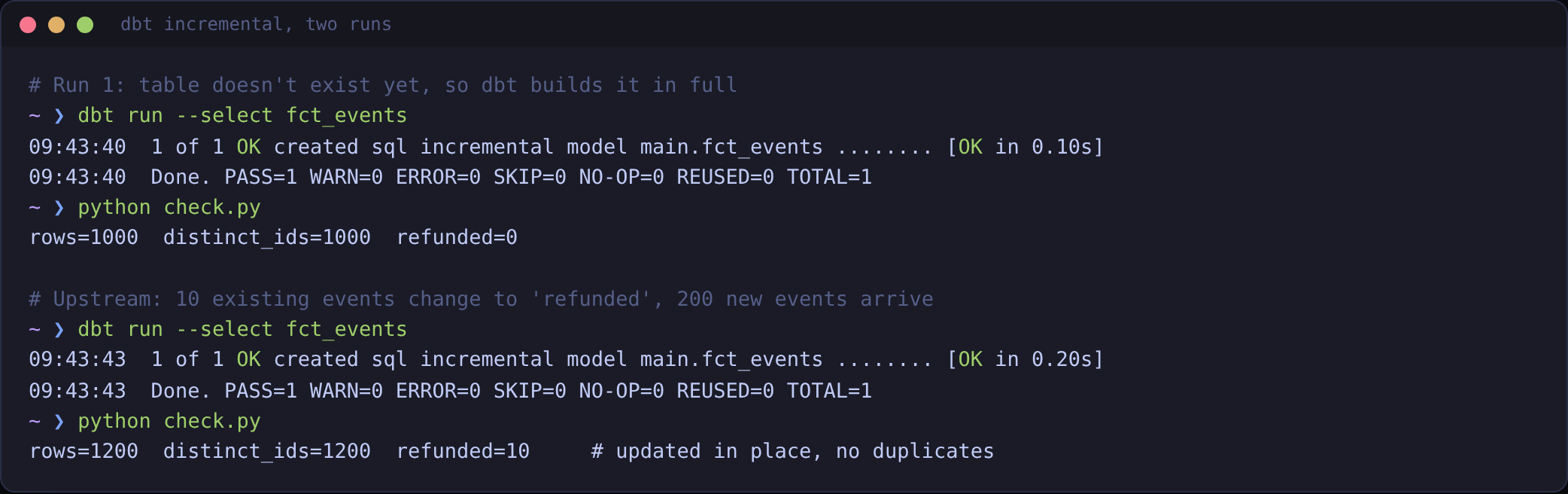
Open target/compiled/.../fct_events.sql after the second run and you'll see the where updated_at > (select max(updated_at) - interval 3 day ...) filter that is_incremental() switched on. When you move to Snowflake, only the profile changes.